



IXIDE: Why Your Wallet Balance May Differ From the Amount Available to Send
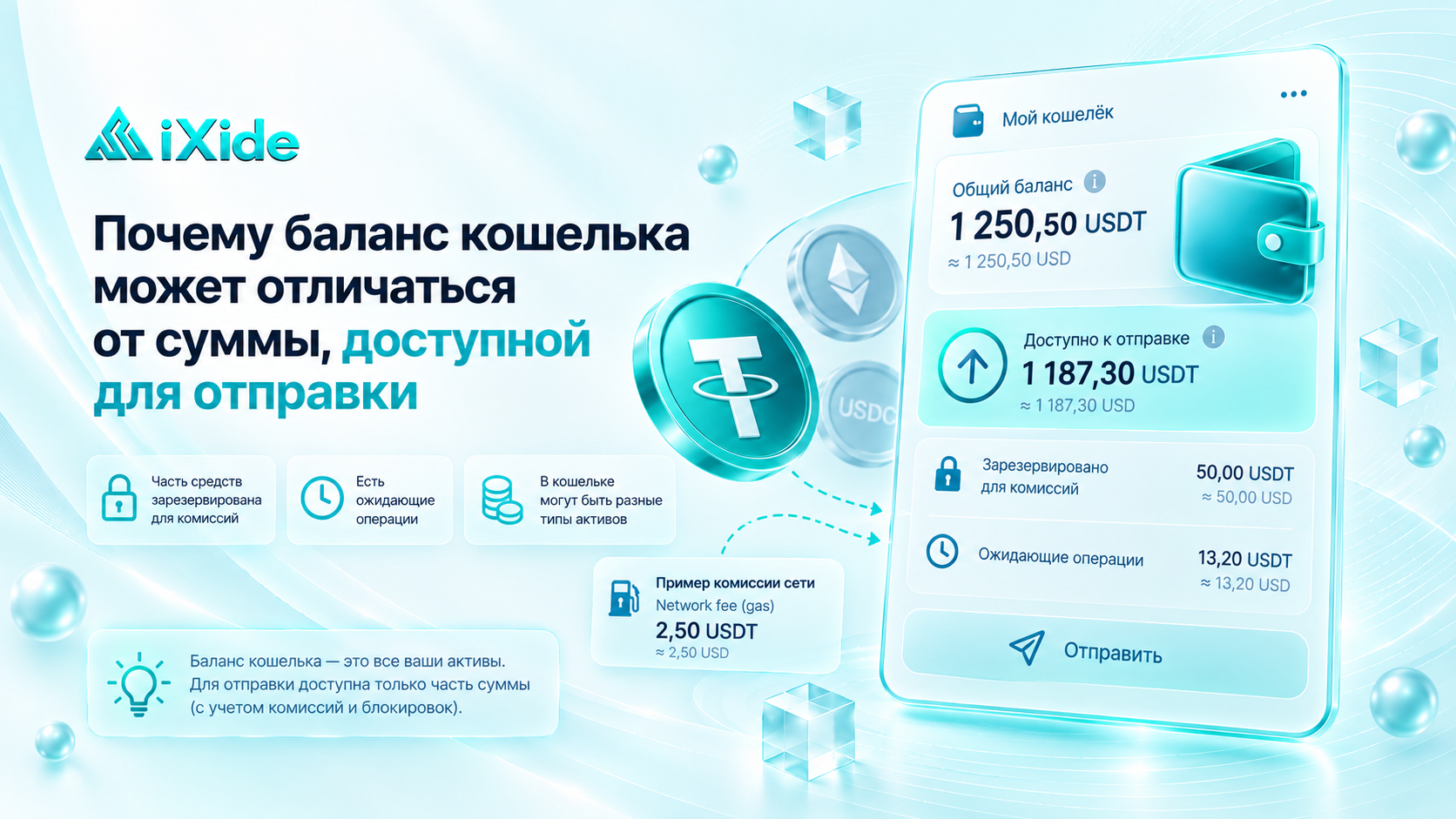
Sometimes a user opens a crypto wallet and sees, for example:
Balance: 1,000 USDT
but when they try to send funds, the app only allows them to transfer part of that amount — or even reports that there are not enough funds.
At first glance, it may seem that the wallet is showing the wrong balance. In practice, your total balance and the amount you can send right now are not always the same thing.
Let’s look at the main reasons why.
Balance vs. Available Amount — What’s the Difference?
Balance shows how many assets are associated with your address or account.
Available amount shows how much of those funds can actually be used for a new transaction right now.
The difference may appear because of:
network fees;
pending transactions;
locked funds;
blockchain-specific rules;
open orders or internal platform restrictions.
So a situation like this:
Balance: 1,000
Available: 985
does not necessarily mean something is wrong.
Network Fees
The simplest reason is that sending cryptocurrency usually requires a network fee.
For example, if a user owns Bitcoin, part of the BTC balance will be needed to pay the network fee.
For example:
Balance: 0.010 BTC
but sending the full 0.010 BTC may not be possible because part of it must remain available for the transaction fee.
Most wallets automatically calculate the maximum amount that can actually be sent.
Why Is USDT Different?
USDT is a token that exists on multiple blockchains.
The transaction fee is often paid not in USDT itself, but in the native asset of the network.
For example:
USDT ERC-20 → fee paid in ETH
USDT on BNB Smart Chain → fee paid in BNB
On TRON, transaction costs are tied to network resources, and if there are not enough resources available, TRX may be consumed.
So a user may have:
500 USDT
but still be unable to send it if there is not enough native network asset to pay the transaction cost.
The USDT is still there — but the wallet does not have enough gas to move it.
Why Can’t the Fee Simply Be Deducted From USDT?
USDT and ETH, for example, are different assets.
Ethereum requires gas fees to be paid in its native currency — ETH.
So a regular non-custodial wallet cannot simply do:
500 USDT → send 499 USDT → use 1 USDT for gas
if the Ethereum network itself requires the fee to be paid in ETH.
Some services may hide this complexity from the user, but the network fee still has to be paid according to the rules of the blockchain.
Pending Transactions
Another reason may be transactions that have already been sent but are not yet fully completed.
For example, a user sends part of their BTC balance, but the transaction is still waiting in the mempool.
Until it is confirmed, the wallet may treat those funds as already committed.
As a result, the total balance may be displayed one way while the amount available for a new transaction is lower.
Once the previous transaction is confirmed, the figures usually update.
What Is Pending Balance?
Some apps display several balance categories separately:
Total Balance;
Available Balance;
Pending;
Locked.
For example:
Total: 1,000 USDT
Available: 800 USDT
Pending: 200 USDT
This means the total balance already includes certain funds, but 200 USDT cannot yet be used for another transaction.
The exact reason depends on the service.
Locked Funds
On centralized services, part of the balance may temporarily be unavailable.
For example, funds may be:
reserved in an open order;
included in a withdrawal request;
used as collateral;
locked in staking;
allocated to another financial product;
temporarily restricted by the platform.
In this case, the asset still belongs to the account but is not part of the available balance.
Open Orders on an Exchange
Imagine:
The account contains 1,000 USDT.
The user places an order to buy BTC for 400 USDT.
The exchange may reserve those 400 USDT for the order.
As a result:
Total balance: 1,000 USDT
Available: 600 USDT
Until the order is filled or cancelled, the reserved funds cannot be used again.
Bitcoin and UTXO
Bitcoin balances work differently from a traditional bank balance.
A Bitcoin wallet balance is made up of separate UTXOs — unspent transaction outputs from previous transactions.
For example, the wallet may contain:
0.003 BTC
0.005 BTC
0.002 BTC
Together, the wallet shows:
0.010 BTC
When the user sends funds, the wallet selects the necessary UTXOs, pays the network fee, and usually sends the remaining amount back as change.
That means the maximum available amount depends not only on the total balance but also on transaction size and fees.
Why Can Bitcoin Fees Differ?
Bitcoin fees do not depend only on the amount being sent.
They also depend on the size of the transaction in bytes or virtual bytes.
If the wallet has to use many small UTXOs, the transaction becomes larger.
As a result, the fee may also become higher.
So two wallets with the same BTC balance may still have slightly different maximum sendable amounts.
Funds Can Be Locked or Vested
Some tokens have additional restrictions.
Part of the balance may be:
locked by a smart contract;
unavailable until a specific date;
subject to vesting;
used as collateral.
The wallet or platform may show the asset in the total balance even though it cannot yet be freely transferred.
The Balance Updated, but the Available Amount Did Not
Sometimes the reason is simply a delay in the interface.
A wallet may rely on:
RPC servers;
indexers;
its own backend;
cached data.
Because of this, different balance values may not update at exactly the same time.
For example, a blockchain explorer may already show the latest transaction while the wallet still displays an older available balance.
In that case, it can be useful to check the address directly in the network’s blockchain explorer.
Why Exchanges and Personal Wallets Work Differently
In a personal non-custodial wallet, fund availability is mostly determined by blockchain rules.
On a centralized exchange or other service, internal platform rules also apply.
For example:
funds may be reserved;
a withdrawal may still be processing;
assets may be used in an open order;
part of the balance may be unavailable because of internal operations.
That is why it is important to understand where the cryptocurrency is actually held: on your own blockchain address or on an internal platform balance.
Why Does the MAX Button Sometimes Show Less Than the Balance?
Many wallets include a:
MAX
button.
It automatically calculates the maximum amount that can be sent.
For example:
Balance: 1 ETH
After pressing MAX:
Send: 0.9987 ETH
The remaining amount is reserved for the network fee.
If the user manually enters the full 1 ETH, the wallet may show an Insufficient funds for gas error.
What Does “Insufficient Funds” Mean?
The message Insufficient Funds does not always mean that you do not have enough of the token you want to send.
For example, the user may have enough USDT but not enough ETH to pay for gas.
In that case, the problem is not the USDT balance — it is the lack of the network’s native asset for the transaction fee.
So it is important to check which asset is actually missing.
How to Find the Reason Yourself
If your balance is higher than the amount available to send, first check:
whether there are pending transactions;
what network fee the wallet is showing;
whether you have enough of the network’s native coin;
whether there are open orders;
whether funds are locked in staking or another operation;
whether the blockchain explorer shows the same balance.
This is usually enough to identify the cause.
What Does This Mean for IXIDE Users?
When exchanging through IXIDE, it is important to consider not only the balance shown in your wallet, but also the amount that is actually available to send.
If an order is created for a specific amount of cryptocurrency, make sure in advance that you can send the required amount after accounting for the network fee.
Pay particular attention to:
the network;
available balance;
network fee;
availability of the native coin for gas;
the amount specified in the order.
If your wallet does not allow you to send the required amount, do not reduce the transfer amount without first checking the terms of the active order.
IXIDE Recommends
Before creating a large transaction, look not only at Total Balance, but also at Available Balance or the amount shown by the MAX function.
If you are sending a token, also make sure the wallet contains enough of the network’s native coin to pay the transaction fee.
Your balance shows how many assets you have. Your available balance shows how much of them you can actually use right now.
Key Takeaway
Your wallet balance may differ from the amount available to send for several reasons:
a network fee must be paid;
some funds are already involved in a pending transaction;
assets are reserved in an open order;
funds are locked;
the wallet does not have enough of the network’s native coin;
the wallet interface has not updated yet.
So an “Insufficient Funds” message does not always mean that your cryptocurrency has disappeared.
First, check your available balance, transaction fee, and the status of existing transactions — and only then create a new transfer.