
IXIDE: Why a Token Exists on the Blockchain but Doesn’t Appear in Your Wallet
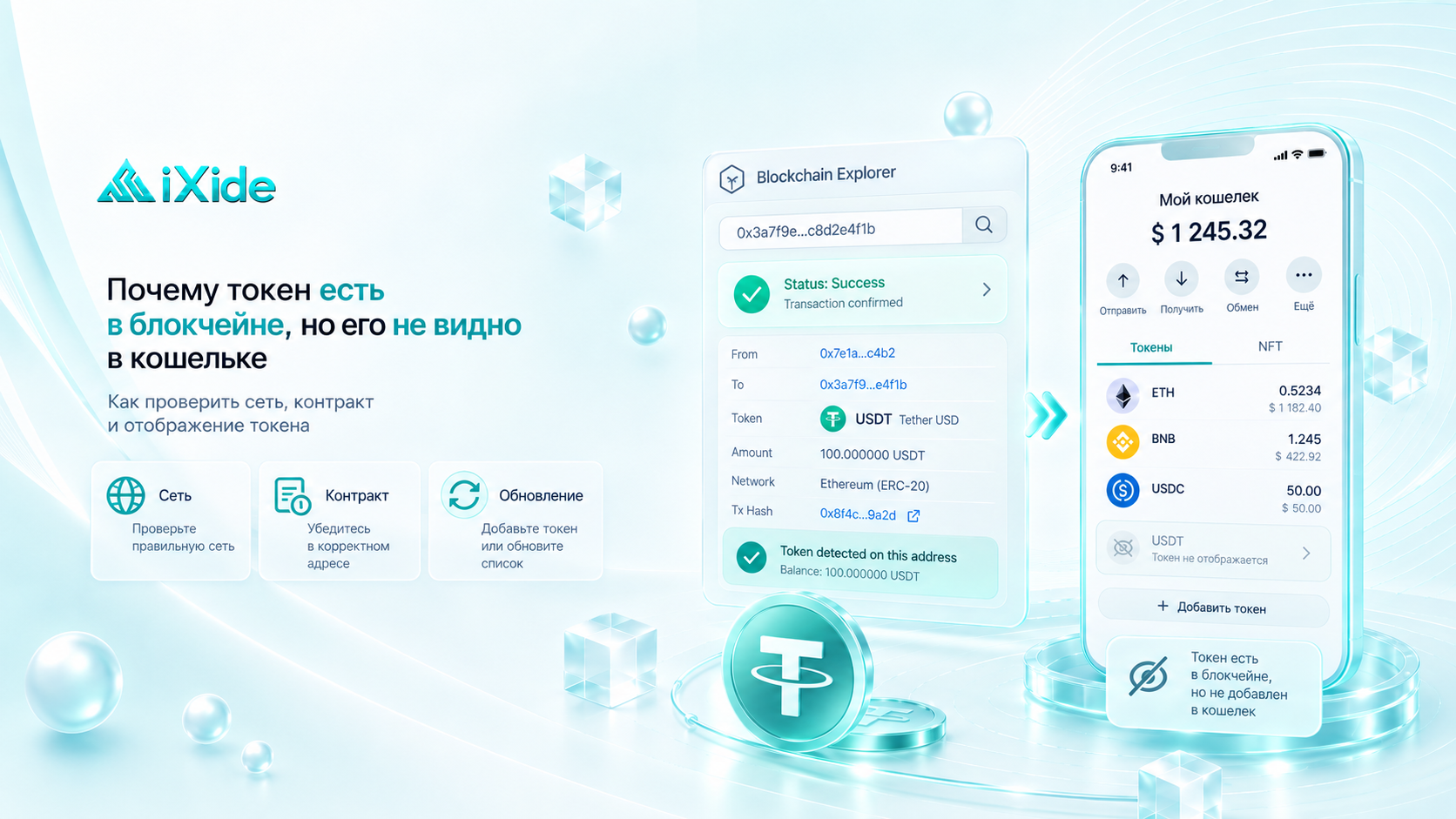
Sometimes a user opens a blockchain explorer, sees a successful transaction and the correct token on their address, but the wallet app still shows the old balance.
At first, it may seem that the funds are lost. In reality, the blockchain and the wallet interface are not the same thing.
If the token is actually present on your address in the blockchain, the issue is often related to how the wallet displays the data.
Let’s look at the main reasons.
The Blockchain and the Wallet Are Different Things
Cryptocurrency is not physically stored inside the wallet application.
Information about tokens and transactions exists on the blockchain, while the wallet simply reads that data and displays it in a convenient interface.
In simple terms:
blockchain stores the data → wallet reads it → user sees the balance.
That is why a token may already be visible on-chain while the wallet app still does not show it.
The Token Has Not Been Added to the Wallet Interface
This is one of the most common reasons.
Some wallets automatically display only popular assets. Other tokens may need to be added manually.
For example, a token may already be on your Ethereum address, but the wallet does not display it.
In that case, you may need to add:
the network;
token contract address;
token symbol;
decimals, if the wallet does not detect them automatically.
After that, the balance may appear without any additional transfer.
What Is a Token Contract Address?
In networks such as Ethereum and BNB Smart Chain, many tokens can have identical or very similar names.
That is why a wallet identifies a token not only by the label USDT, USDC, or another ticker, but primarily by its smart contract address.
For example, a legitimate USDT token and a fake token may both be called:
USDT
but have completely different contract addresses.
The contract address determines which token you are actually interacting with.
You Are Looking at the Wrong Network
This is another common situation.
One wallet may support multiple blockchains:
Ethereum;
BNB Smart Chain;
Polygon;
Arbitrum;
Base;
other networks.
At the same time, addresses in EVM-compatible networks may look identical and start with 0x.
For example, a user receives USDT on BNB Smart Chain but opens Ethereum in the wallet.
The token will not appear under Ethereum, even though it is present on the same 0x address in BNB Smart Chain.
In this case, the user simply needs to switch to the correct network.
The Same Address Does Not Mean the Same Network
This is especially important with EVM-compatible networks.
An address such as:
0x123...ABC
may exist across several compatible blockchains.
But assets on those networks remain separate from each other.
If you receive:
USDT BEP20
it does not mean that the same USDT balance will appear on Ethereum.
You must check the balance on the exact network used for the transfer.
The Wallet Has Not Updated Yet
Sometimes everything is configured correctly, but the app still shows an outdated balance.
Possible reasons include:
delayed refresh;
RPC server issues;
temporary app errors;
wallet indexer delays;
cached data.
At the same time, the blockchain explorer may already show the correct balance.
In this situation, it may help to:
refresh the app;
restart the wallet;
switch between networks;
wait a little;
check the address in another explorer.
What Is RPC and Why Does It Affect the Balance?
Wallets usually receive blockchain data through RPC nodes.
These nodes provide information about:
balances;
latest blocks;
transaction status;
smart contracts.
If the RPC node is delayed or temporarily unavailable, the wallet interface may display outdated information.
The funds themselves, however, remain on the blockchain.
The Transaction Is Successful, but the Token Was Sent to the Wrong Place
It is important to distinguish a display issue from an actual transfer mistake.
A Success status means the blockchain executed the transaction as instructed.
But the network does not verify whether the recipient address belongs to the person or service you intended to pay.
Always check:
recipient address;
network;
token;
contract address.
A successful transaction does not guarantee that the correct destination was used.
Why Can the Token Appear in the Explorer but Not in the Wallet?
A typical situation looks like this:
The user opens the TXID and sees:
Status: Success
Then they open their address and see the token.
But the wallet balance is still zero.
If the address, network, and contract all match, this is a strong sign that the problem is related to the wallet interface rather than the transaction itself.
How to Check Whether the Token Is Really on Your Address
Find the TXID and open it in the blockchain explorer for the correct network.
Check:
transaction status;
recipient address;
network;
token name;
contract address;
token amount.
Then open the recipient address itself in the explorer and check the token list.
If the token is present there, the blockchain recognizes it regardless of whether the wallet app displays it.
Be Careful With Unknown Tokens
Sometimes unknown assets suddenly appear in a wallet even though the user never bought or requested them.
These may be:
promotional tokens;
spam;
fake airdrops;
phishing tokens.
The fact that an unknown token appears on your address does not mean you should interact with it.
Be especially careful if the token asks you to visit an unknown website to “claim,” “unlock,” or “exchange” it.
What If the Funds Were Sent to an Exchange or Crypto Service?
This situation is slightly different.
A centralized service may support a specific token only on certain networks.
For example, the blockchain may show that the token successfully arrived at the service’s address, but the platform may not support:
that network;
that token;
that specific deposit method.
In this case, the token being present on-chain does not automatically mean it will be credited to the internal account balance.
The receiving service’s rules still matter.
What Does This Mean for IXIDE Users?
When exchanging through IXIDE, it is important to use exactly the:
cryptocurrency;
network;
address;
Memo or Tag, if required,
shown in the active order.
If the transaction already has a Success status but the expected result is not visible yet, first check the TXID.
Make sure the sending network matches the network specified in the order.
If everything is correct, the TXID helps confirm whether the funds actually reached the intended address and which token was transferred.
What Should You Do If the Token Is Not Showing?
Do not immediately send the token again.
First:
check the TXID;
verify the recipient address;
check the network;
find the token on your address using a blockchain explorer;
compare the contract address;
switch to the correct network in the wallet;
add the token manually if necessary.
If the blockchain shows the correct balance but the wallet does not, the issue is most likely related to the wallet interface.
IXIDE Recommends
Before sending cryptocurrency, always check not only the token name but also the network.
And if the transfer has already been completed, rely primarily on blockchain data.
The wallet is an interface. The blockchain is the source of truth for the actual transaction and asset state on the address.
Key Takeaway
If a token does not appear in your wallet, it does not necessarily mean it is lost.
Possible reasons include:
the token has not been added to the wallet interface;
the wrong network is selected;
the wallet has not refreshed the balance yet;
the RPC is temporarily showing outdated data;
the service does not support that specific token or network.
The first thing to do is find the TXID and check the address in a blockchain explorer.
If the token is really on the correct address and network, the next step is to solve the display issue rather than sending the funds again.